The Perfect Photo for the Virtual Wedding Dress Try-On
Get the best results from the virtual wedding dress try-on in 5 steps: framing, background, lighting, clothing and posture.
Created with AI assistance and human review. Editorial standards
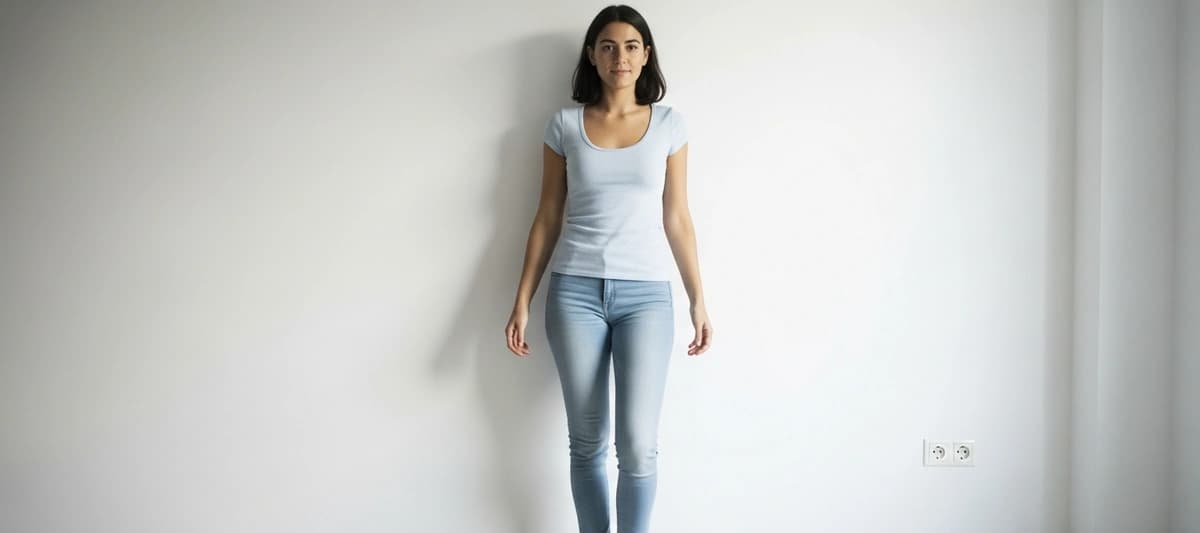
Preparing a good photo for the virtual wedding dress try-on takes no more than ten minutes. But the difference between a prepared photo and any photo can be the difference between a result that helps you decide and one that leaves you with more questions than answers. This guide tells you exactly what to do, step by step, so that the first photo you upload is already a good one.
The essentials
- The virtual try-on works best with a full-length photo, a neutral background, natural front-facing light, and fitted clothing.
- You do not need a professional camera: a phone propped on a chair and the self-timer is enough.
- Mirror selfies with the arm raised are the most common mistake — and the easiest to avoid.
- If the photo is not perfect the try-on still works, but the result is less accurate.
- Ten minutes of preparation gets you results you can actually use to make decisions.
Why the photo matters
The Wedded virtual try-on works by analysing your actual silhouette from the photo you upload. From there, it overlays the dress by adapting it to your proportions. If the photo clearly shows your figure, the result is accurate and useful. If the photo has visual noise, poor lighting, or clothing that distorts your silhouette, the system is working with incomplete information and the result loses precision.

It is not that the app fails — it simply starts with less data and, therefore, produces less accuracy. The good news is that preparing a valid photo is very straightforward. You do not need a photoshoot, special clothing, or any extra equipment.
The five steps to the perfect photo

Step 1. Framing — full body, from head to toe
This is the starting point. The photo must show your complete figure, from the tips of your toes to above the top of your head.
The easiest way to achieve this: prop your phone on a chair, shelf, or any stable surface at roughly waist height, set the 2-second self-timer, and step back until your whole figure fits in the frame. Landscape mode is not needed — portrait mode works perfectly well.
What to avoid: photos that only show you from the knees or waist up, and mirror selfies with the arm raised. The arm position distorts your shoulder and makes it harder for the system to detect your silhouette accurately.
Step 2. Background — plain wall, neutral colour
The ideal background is a white or uniformly coloured wall with nothing behind you. It does not need to be perfectly plain — a slightly textured wall works fine. What does not work well is a very busy background: patterned curtains, gallery walls, full bookshelves, or windows with strong light behind you.
If your home does not have a clear wall anywhere, a closed door or an exterior wall works well. The goal is for your silhouette to be the only main element in the image.
Easy tip: the wall of a hallway is usually the cleanest in the house.
Step 3. Lighting — natural front-facing light, no shadows
The best lighting for the virtual try-on is natural light from the front. That means standing facing a window, with the light falling directly onto your face and body.
What to avoid:
- Backlighting: if the window is behind you, you will be in shadow and the system cannot read your silhouette well.
- Strong overhead light: spotlights directly above your head cast harsh shadows on your face and neck.
- Mixed lighting: combining window light with warm artificial lamps creates uneven colour in the image.
If you do not have good natural light when you want to take the photo, a floor lamp placed in front of you works perfectly well. Nothing more is needed.
Step 4. Clothing — fitted, no bulky layers
The virtual try-on needs to see your actual silhouette in order to fit the dress correctly. That is why what you wear in the photo matters.
What works best: leggings, a stretch t-shirt, underwear, or a swimsuit. Any garment that clearly shows your proportions.
What does not work: baggy jumpers, floaty blouses, wide hoodies, or padded sportswear. These types of garments add artificial volume that the system confuses with your actual silhouette.
You do not have to be in your underwear if that is not comfortable — a very fitted basic t-shirt works just as well.
Step 5. Posture — facing forward, arms separated, feet visible
Your posture directly affects how well the system detects the key reference points: your shoulders, waist, and hips.
The ideal posture:
- Facing the camera directly, without turning your body or your feet.
- Feet slightly apart and fully visible in the frame.
- Arms at your sides with a small gap between your arms and your body — enough for the system to see where you end and the background begins.
- Back straight, shoulders relaxed.
What to avoid: crossing your arms, placing your hands on your hips, or putting your arms in any position that hides part of your silhouette.
Good photo vs. any photo — what difference does it make in practice
To make it concrete, here is what happens with each type of photo:

Well-prepared photo (full body, neutral background, front-facing light, fitted clothing, facing forward): the system accurately detects your proportions and the virtual dress fits your silhouette realistically. The result is genuinely useful for making decisions about necklines, waistlines, and lengths.
Mirror selfie with arm raised: the raised arm distorts the shoulder and the system struggles to detect your proportions in that area. The dress may sit off-centre or with the shoulder line misaligned.
Photo with very baggy clothing: the system mistakes the volume of the clothing for your actual silhouette, and the virtual dress may appear wider than you actually are.
Photo with a cluttered background or backlighting: the system struggles to separate your figure from the background and the outline may be imprecise.
In all these cases the virtual try-on returns a result. But the difference in usefulness between a well-prepared photo and a poorly prepared one is significant — especially when you are making decisions about necklines and silhouettes you have not tried before.
All included
- Banquet venue
- Wedding Planner
- Marriage Paperwork
- Photographer
- Décor
- Flowers
- Master of Ceremonies
- Deejay
- Open Bar
What happens if your photo is not perfect
The Wedded virtual try-on works with imperfect photos. If the lighting is not ideal, if the background has a little visual noise, or if you are wearing a t-shirt that is not quite fitted enough, the app still processes the image and returns a result.
What changes is the accuracy. A photo with suboptimal conditions gives a more approximate result, which may be enough to get a general sense of a silhouette, but may not be reliable enough for finer decisions.
If your first result does not convince you, do not dismiss the dress without first trying again with a better-prepared photo. The difference in the result is sometimes striking.
Quick checklist before taking the photo
Before you activate the self-timer, run through this list:

- Your phone is propped on a stable surface (not held in your hand).
- The frame shows your full figure from head to toe.
- The background behind you is clear.
- The light is coming from the front (facing a window or a lamp).
- There is no window behind you creating backlighting.
- You are wearing fitted clothing that shows your silhouette.
- You are facing the camera directly, with your arms slightly away from your body.
- Your feet are visible in the frame.
If every point is checked, the photo is ready. Take two or three shots with the self-timer and keep the one that best meets these conditions.
Try it now
With a well-prepared photo, the Wedded virtual try-on lets you see how a real wedding dress would look on your body before booking a single appointment. The first 5 try-ons are free, with no credit card required.
If you are not yet sure exactly how the virtual try-on works, you can read the complete guide to the virtual wedding dress try-on first, then come back to take your photo.
Download Wedded on iOS or Android, take your photo following these five steps, and start discovering the dresses that match your style. The whole process — from installing the app to seeing your first result — takes less than five minutes.
Related reading
This article was reviewed by our editorial team. How we create our content
Frequently Asked Questions
Not sure which one suits you?
Try every silhouette on your own photo with Wedded's virtual try-on. The first 5 try-ons are free.


